The process of ship upgrading in Star Citizen Alpha 4.6 builds on systems from previous patches. While the core mechanics remain familiar, this patch brings improvements in inventory, new features, and possibly a new ship; the highly anticipated Railen ship. These updates focus on improvement of gameplay, especially around ship management and component handling. Players will also need to manage their resources efficiently, including Star Citizen aUEC, to make the most of upgrades.
As such, it is important to know how ship upgrades work. By understanding the system, you can plan upgrades strategically. This ensures your ship is versatile and prepared for survival.
This guide explains how ship upgrades function in Alpha 4.6. You will learn about Cross-Chassis Upgrades (CCUs), in-game component swaps, and what the upcoming patch may offer.
Understanding Ship Upgrades in Star Citizen
In Star Citizen, there are two major avenues for upgrading your ship:
- Cross-Chassis Upgrades (CCUs) – These let you change your ship’s entire chassis through the RSI pledge store.
- In-game Component Upgrades – Here, you swap individual parts like weapons, power plants, and shields using Mobiglas.
Both systems are key for setting up your ship to handle specific roles or missions.
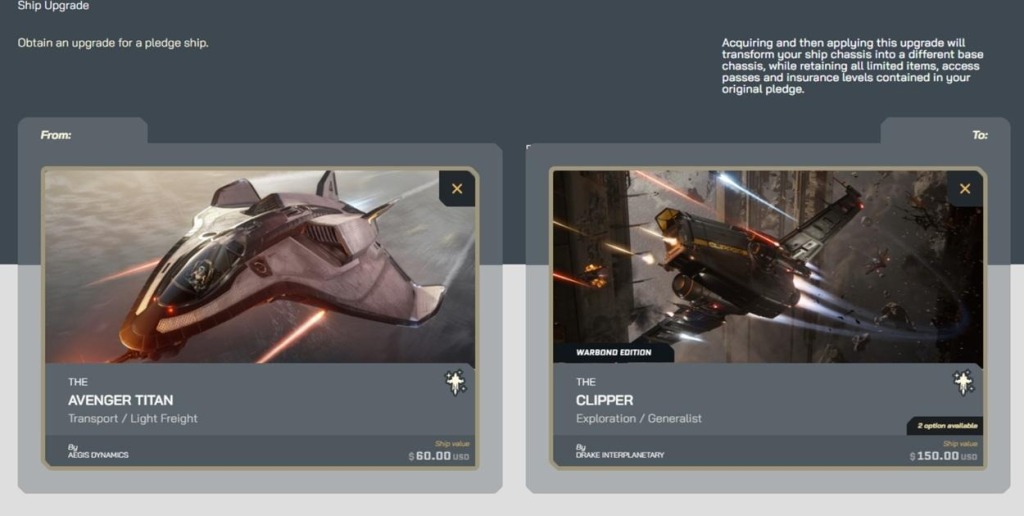
What is a CCU (Cross-Chassis Upgrade)?
A Cross-Chassis Upgrade (CCU) is a store-side item that lets you change one ship into another, more expensive ship permanently. However, you will need to pay the difference in value. This does not use in-game credits (aUEC). Instead, it uses real-money pledges or store credit acquired from melting pledges (if you choose that route).
So how do CCUs actually work?
Basically, you pay the difference. If you own a cheaper ship (for example, an Aurora MR) and want a more capable ship (like a Sabre), you can use a CCU to buy Star Citizen ships directly from the RSI pledge store. You’ll pay only the difference between the two ships’ store values, so there’s no need to cover the full price again.
Once you apply the CCU, your old ship is replaced with the new one in your pledge list. And the upgrade is permanent. This means that you cannot revert to the original ship unless you melt the new pledge and (if possible) rebuy the old ship separately.
Also, most of the original ship’s perks are transferred to the new ship. This includes your old ship’s insurance (especially Lifetime Insurance) and cosmetic items. The upgraded hull inherits the highest applicable insurance.
Why CCU Chains Are Popular
Firstly, CCU Chains are cheap. Each CCU has a price tied to the difference between ship values. So, when you choose intermediate ship, especially during Warbond or Expo sales, you can reduce the total amount you pay overall.
Also, it is possible to carry lifetime or long-term insurance upward through CCUs. In fact, you can start with a cheap LTI ship and eventually apply that insurance to a much more expensive hull. Technically, this means you can “freeze” insurance that would otherwise be expensive or unavailable.
How to Apply a CCU Step-by-Step
- Log in to your RSI account and navigate to the Ship Upgrades section.
- Browse upgrade options. You will see ships you can upgrade from and possible targets.
- Purchase the upgrade using store credits or money.
- Go to My Hangar on the RSI site, and look for the new upgrade.
- Click ‘Apply Upgrade’ to convert your existing ship’s pledge into the new one. Once applied, your upgraded ship replaces the old one in your hangar list.
Limitations of CCUs
To begin with, CCUs do not support downgrades. As such, you can only increase ship value. You cannot use them to go to a cheaper or equal-priced ship; only to more expensive ones.
Also, availability depends on inventory. Upgrades are tied to what ships are currently offered in the pledge store. Limited-edition or retired ships will not show CCUs unless they are made available again.
Another limitation is that you cannot purchase them with in-game UEC. This is because CCUs are part of the pledge system. They are strictly store transactions. Even after buying a CCU, you must manually apply it via the hangar page. They do not apply automatically.
In-Game Component Upgrades
Star Citizen’s upgrade story does not end with CCUs. Once you are in the game, you can also swap components and weapons to adjust performance. Also, you adjust power draws, improve durability, or tweak a ship to specific roles.
Where to Buy Components
You can buy components in large landing zones such as Area18, New Babbage, Lorville, and Orison. There, you will find ship shops that sell individual components. You can get items including power plants, shields, weapons, and quantum drives. Also, there are smaller outposts and space stations that carry limited stock.
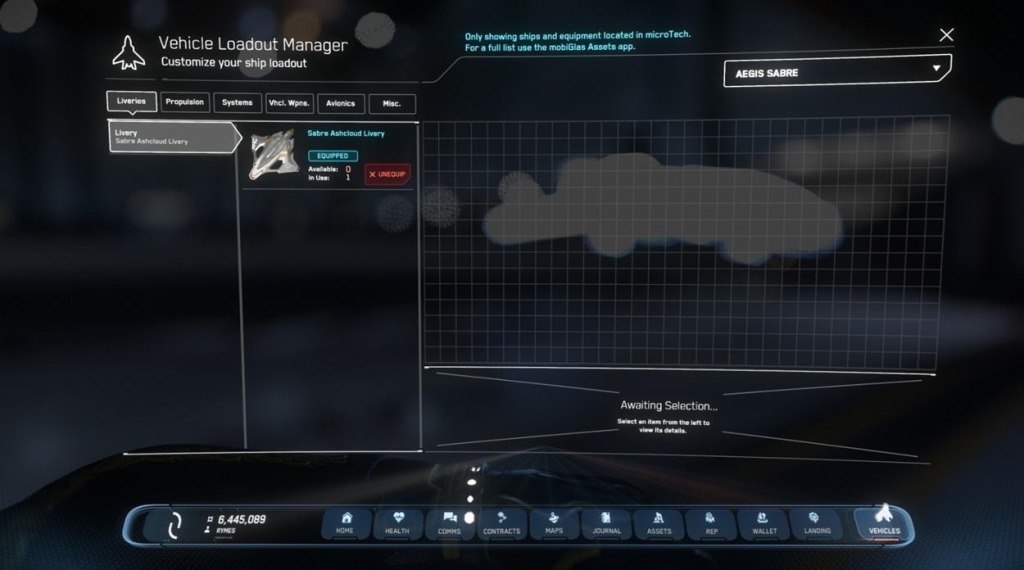
The Vehicle Loadout Manager (Mobiglas)
Once you’ve purchased a component, installing it is intuitive through the Vehicle Loadout Manager inside your Mobiglas (F1). The thing that you have to do is to select the ship that you want to upgrade, go to the Systems tab and select the part that you would like to install. When it is compatible, then the UI will automatically mount the same for you.
Types of Components You Can Upgrade
- Power Plant: This provides energy for all systems. Notably, bigger plants give more power but may draw more heat.
- Shield Generator: It increases the shield’s strength and regeneration.
- Quantum Drive: It improves travel range and cooldowns.
- Weapons: When you upgrade your guns or missiles, it increases your survival in combat.
- Coolers & Batteries: These are used to regulate heat and power redundancy.
Conclusion
Your ability to upgrade ships in Star Citizen Alpha 4.6 will give you a better chance to survive and be versatile. And now, you can choose to go for either the CCUs or the In-game Component Upgrades. Whichever one you pick, ensure that your ship is perfectly equipped for its intended role.